Krush Apex External
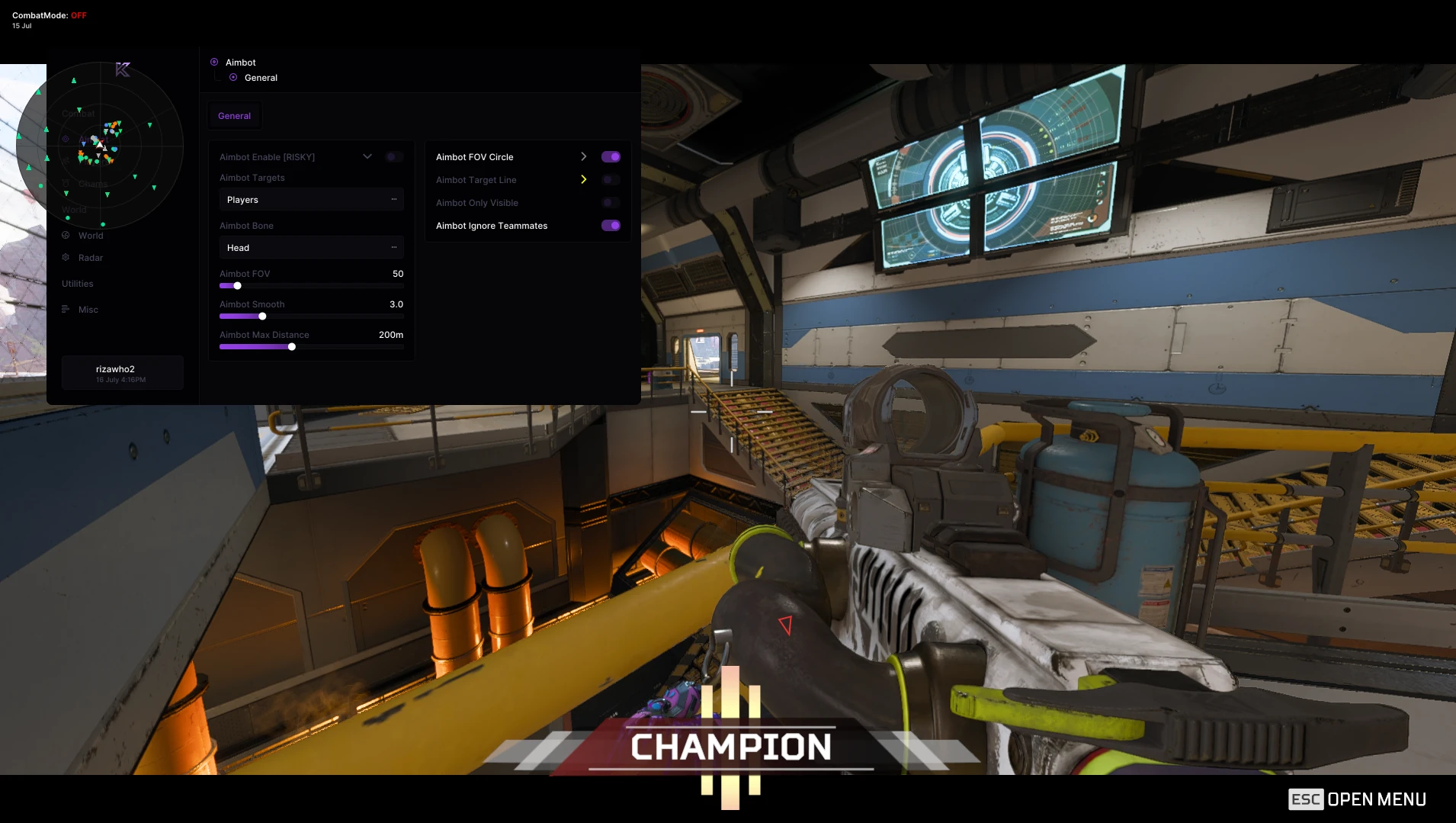
TESTINGAimbot
- Aimbot Enable [RISKY] [Keybind]
- Aimbot Targets [Multi: Players]
- Aimbot Bone [Dropdown: Head / Neck / Chest / Root]
- Aimbot FOV [Slider: 10-500]
- Aimbot Smooth [Slider: 1-10]
- Aimbot Max Distance [Slider: 10-500m]
- Aimbot FOV Circle [+ Color]
- Aimbot Target Line [+ Color]
- Aimbot Only Visible
- Aimbot Ignore Teammates
Visuals
- Player Enabled
- Hide Teammates
- Player BoxType [Dropdown: 2D / 3D / Corner]
- Player Max Distance [Slider: 0-2000m]
- Player Skeleton [+ Color Vis / Color Not Vis]
- Player Box [+ Color]
- Player Direction [+ Color]
- Player Head [+ Color]
- Player Health [+ Color]
- Player Shield [+ Color]
- Player Distance [+ Color]
- Player Squad [+ Color]
- Player Name [+ Color]
- Player Weapon [+ Color]
- Player Text Position [Dropdown: Top / Bottom]
- Player Chams [+ Color / VisColor]
World ESP
- Loot Enabled
- Loot Max Distance [Slider: 0-2000m]
- Weapon Name [+ Color]
- Weapon Distance [+ Color]
- Ammo Name [+ Color]
- Ammo Distance [+ Color]
- Attachment Name [+ Color]
- Attachment Distance [+ Color]
- Gear Name [+ Color]
- Gear Distance [+ Color]
- Healing Name [+ Color]
- Healing Distance [+ Color]
- Container Enabled
- Container Max Distance [Slider: 0-2000m]
Radar
- Radar Enabled
- Radar Shape [Dropdown: Circle / Square]
- Radar Size [Slider: 100-400px]
- Radar Range [Slider: 25-500m]
- Radar Opacity [Slider: 10-100%]
- Radar Crosshair
- Radar Range Rings
- Radar FOV Cone
- Radar Rotate
- Radar Direction
- Radar Dot Size [Slider: 4-20px]
- Radar Categories [Multi: Players / Weapons / Ammo / Attachments / Healing / Gear / Containers]
Color Selector
- Radar Background [+ Color]
- Radar Grid [+ Color]
- Radar Player [Color]
- Radar Weapon [Color]
- Radar Ammo [Color]
- Radar Attachment [Color]
- Radar Healing [Color]
- Radar Gear [Color]
- Radar Container [Color]
Misc
- Font Size [Slider: 8-32]
- VSync
- FPS Cap [Slider: 30-500]
- DPI [Dropdown: 75% / 100% / 150% / 200%]
- Auto scale
- ESP Background
- ESP Background Opacity [Slider: 0-100%]
- ESP Background Categories [Multi: Players / Containers / Loot]
- Player OOFArrows [+ Color]
- OOFArrows Shape [Dropdown: Filled / Outline]
- OOFArrows Radius [Slider: 50-500]
- OOFArrows Length [Slider: 4-50]
- OOFArrows Width [Slider: 3-40]
- CombatMode [Keybind]
- CombatMode Filter [Multi: Weapons / Ammo / Attachments / Healing / Gear / Containers]
- Menu Bind [Keybind]
- Panic Mode [Keybind]
- Create / Save Current / Reset to Defaults
- Load / Delete configs
NFA / PRODUCT GUIDE
Krush Apex External: Features, Plans and Support
Use this NFA guide to compare the listing's features, system requirements and access options. Krush Apex External has its own product description; the features and delivery instructions for another listing should not be assumed to apply.
Read the exact feature list
NFA's software catalog includes different games, providers and tool types. Read this product's feature description and screenshots to see what is listed for the current item. Visual options, aim settings, resource information and configuration controls vary between products. A product name alone does not establish that every feature found elsewhere is included.
The internal or external label describes the product type. It does not replace the operating-system, hardware or setup requirements published for this listing.
Compare the system requirements
Check the supported operating system, processor, display mode and any USB or other prerequisites. Product-specific instructions take priority over assumptions from an older Rust, CS2 or other game listing. If a requirement is unclear, ask NFA before ordering so that you can confirm whether the published setup matches your computer.
Daily, weekly and monthly access
Available plans are shown in the variant picker. Some products use different periods or offer additional options; only the variants listed on this page are available for this purchase. Compare the full price for your chosen duration and review any activation or access conditions. Check the final checkout total and selected variant before payment.
Product status and updates
Review the current product status before buying and use the NFA status page to compare listings. A status label is a published product update, not a guarantee of future compatibility or freedom from restrictions. Game updates can affect availability. Contact support for clarification if the current information does not answer your question.
Delivery and support
After payment, consult the order page and delivery email for the key or instructions supplied with your purchase. Follow the guide for this exact product and plan. Keep your order reference when requesting help through NFA's support link, and do not post delivered keys, account details or payment information publicly.
Krush Apex External — purchasing FAQ
Does every NFA software product include the same features?
No. Read the description of the selected product. Features differ between games, providers and tool types.
Where can I see current plans and access periods?
Use the variant picker on this page for the durations, prices and availability currently offered.
Is a product status label a permanent guarantee?
No. It describes the published current status. Compatibility and availability can change after updates.
How do I receive the product after payment?
Check the completed order page and order email for the delivered key, access information and product-specific instructions.
Where can I get help with my order?
Use NFA's support link with your order reference and product name. Keep delivered keys and account details private.